How to Set Up Your Own Rating and Premium Calculation Rules in Openkoda PAS
Build a motor rating engine from four tables: derive the ages you do not store, combine the factors, add fees and tax, then price a real risk and reprice it.
Learn how to build and optimize a custom insurance business dashboard in Openkoda to track policies, claims, renewals, and compliance in real time.

Running an insurance business comes with its complexities – managing policies, processing claims, handling renewals, and staying compliant. But inefficiencies in these areas can slow growth, drain resources, and impact customer satisfaction.
A custom dashboard within your insurance system changes the game. By centralizing key metrics such as policy sales, claims processing times, renewal rates, and compliance tracking, you gain real-time visibility into your operations.
This means fewer bottlenecks, faster decision-making, and a more streamlined workflow.
Instead of sifting through spreadsheets or chasing updates, you'll have the insights you need to optimize processes and drive profitability – all in one place.
In this guide, we'll walk you through how to create and optimize an insurance business dashboard using the Openkoda insurtech platform. This will allow you to monitor tasks, visualize performance, and stay ahead of potential challenges.
But first, let's discuss the key metrics you should be monitoring and how to do it.
Success in the insurance industry isn't just about selling policies - it's about managing operations efficiently and proactively addressing challenges. To stay ahead, insurers must track key performance metrics, automate repetitive processes, and leverage AI-driven insights for smarter decision-making.
With the right dashboard, you can monitor policy sales, claims processing times, renewal rates, and compliance adherence in real time. By integrating automation and AI analytics, you can identify inefficiencies, reduce processing delays, and enhance customer satisfaction.
Here's how you can streamline your insurance business with data-driven strategies and the right technology.
A well-designed custom dashboard is essential for tracking key business metrics in real time.
It consolidates critical data from multiple sources so you can monitor your insurance business at a glance. By effectively structuring your dashboard, you can track performance indicators such as new policy sales, claims processing times, policy renewals, customer satisfaction scores, and more. Select the widgets that are most relevant to your role.
For instance, if claims processing times are increasing, you can identify bottlenecks and take action before customer dissatisfaction rises. The ability to see all relevant metrics in one place enables faster, more informed decision-making, ultimately improving operational efficiency.
A platform like Openkoda allows you to create a fully customized dashboard, where you can define widgets and reports tailored to your specific business needs. If you want to learn how to create such a custom dashboard, take a look at the second part of this article, where we will give you a step-by-step tutorial.
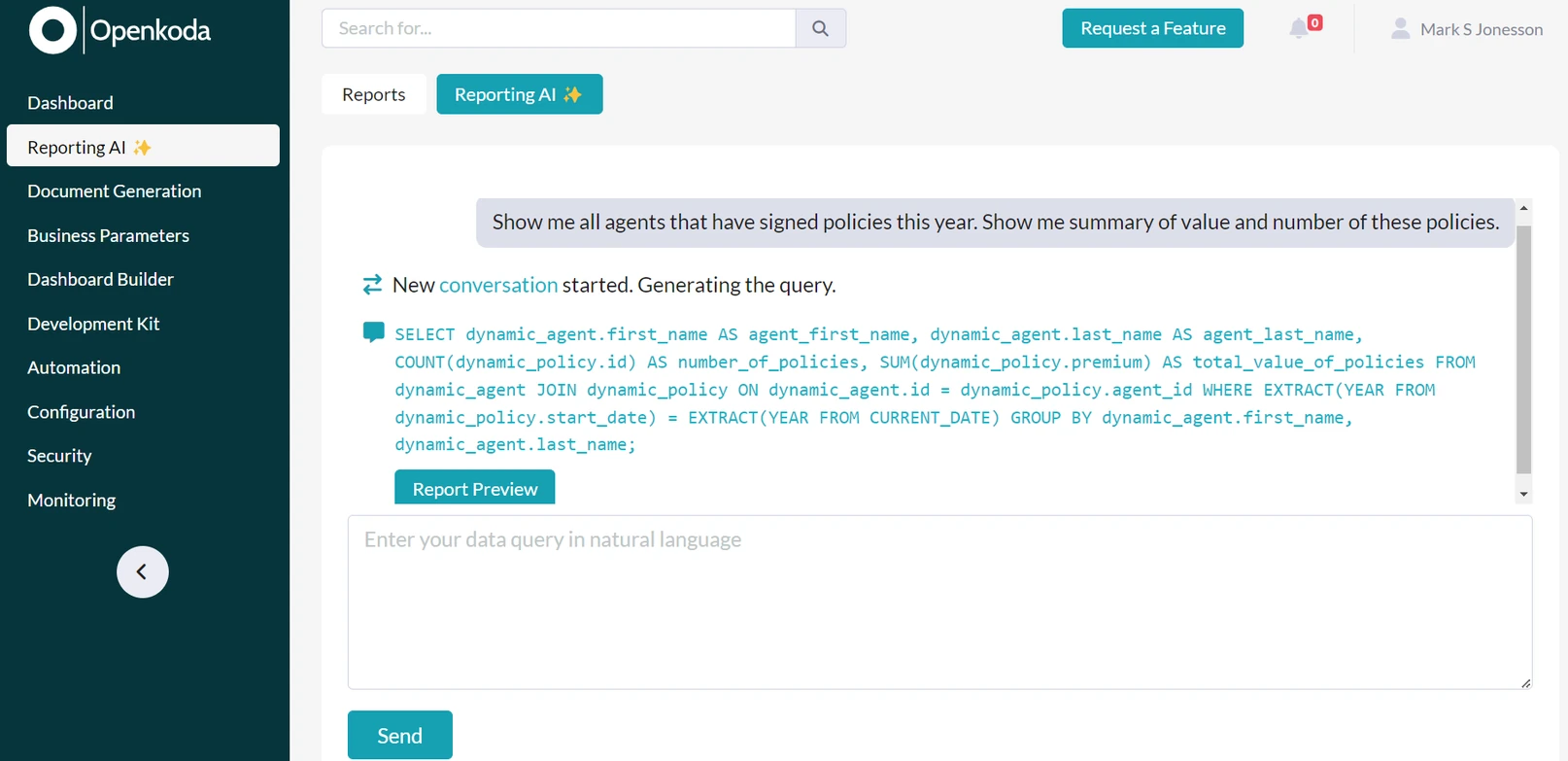
Manual reporting is time-consuming, lead to human errors, and often outdated by the time it reaches decision-makers. By automating reporting processes, you can ensure that your team has access to the most accurate and up-to-date information at all times.
Automated reports can provide daily, weekly, or monthly performance summaries, highlighting key insights such as claim trends, policy renewals, and customer interactions.
Additionally, real-time alerts can be set up to notify your team about important events, such as claims exceeding processing deadlines, signs of potential fraud, or unusual spikes in customer complaints.
By integrating tools like Openkoda's Reporting AI, you can take reporting to the next level by effortlessly generating insights using natural language. Instead of manually sifting through data, you can simply ask questions or create reports ad-hoc using AI-powered prompts. If you need to adjust your results, you can easily refine your prompt and iterate until you get exactly what you're looking for.
The tool has the ability to run AI-generated SQL queries directly within your system, ensuring that your data stays secure without being shared externally.
Once you've generated a report, you can automate it to run periodically for continuous monitoring or export it to Excel to share with your team.
Efficient claims processing relies on automation to reduce delays and improve accuracy. Manual handling slows down operations and increases the risk of errors, frustrating customers and driving up costs.
By automating key workflows of claims management – such as document collection, approvals, and notifications – you can eliminate bottlenecks and ensure claims move seamlessly through the system. Automatic reminders keep processes on track, while instant approvals for low-risk claims speed up resolution times.
With a claims management system like this, your team can focus on complex cases and customer support.
A declining renewal rate is often a sign of dissatisfied customers or ineffective follow-up strategies. By monitoring renewal trends, you can identify which policies are at risk of expiring and take proactive steps to retain customers.
Predictive analytics can play a vital role in this process.
By analyzing historical data, AI can identify customers who are less likely to renew their policies based on factors such as customer behavior, policy usage, and satisfaction levels. Armed with this information, you can implement targeted interventions, such as offering personalized renewal incentives or reaching out with customized communication.
Automation can further streamline the renewal process. Setting up automated custom reminders via email, SMS, or in-app notifications ensures that customers are informed well in advance and can take action without hassle.
Providing clear sales targets, conversion tracking, and task management tools helps insurance agents focus on high-value opportunities and close deals faster.
Monitoring which policies perform best allows insurers to refine their sales strategies and direct resources where they have the most impact.
Encouraging a culture of performance and accountability through transparent tracking and incentives can further improve motivation and results.
Navigating regulatory requirements is a constant challenge for insurers.
Keeping accurate records of policies, claims, and transactions ensures compliance with industry regulations and avoids costly penalties.
Implementing automated reminders and structured workflows helps teams stay on top of reporting deadlines and audits.
Here's how to strengthen compliance and reduce regulatory risks:
By proactively managing compliance with structured workflows and automation, insurers can reduce legal risks, improve operational efficiency, and build trust with both customers and regulators.
The insurance landscape is constantly evolving, with customer preferences, risk factors, and market conditions shifting over time.
Regularly reviewing claims trends, renewal rates, and customer feedback helps insurers stay ahead of potential challenges and personalize their insurance offerings accordingly.
Proactively analyzing risk patterns, pricing strategies, and customer retention efforts enables insurers to make informed business decisions. By staying agile and responsive, insurance companies can maintain profitability while continuing to meet the changing needs of policyholders.
In the previous section, we explored the importance of real-time monitoring, automation, and data-driven decision-making in optimizing your insurance business. Now, we'll take a hands-on approach and show you how to put these concepts into action by building a custom insurance dashboard using the Openkoda platform.
This step-by-step guide will walk you through setting up your dashboard, selecting the right data sources, integrating reports, and customizing the layout to fit your specific needs. By the end, you'll have a powerful tool that centralizes critical business insights, streamlines operations, and enhances decision-making.
Follow the steps below or watch a video tutorial:
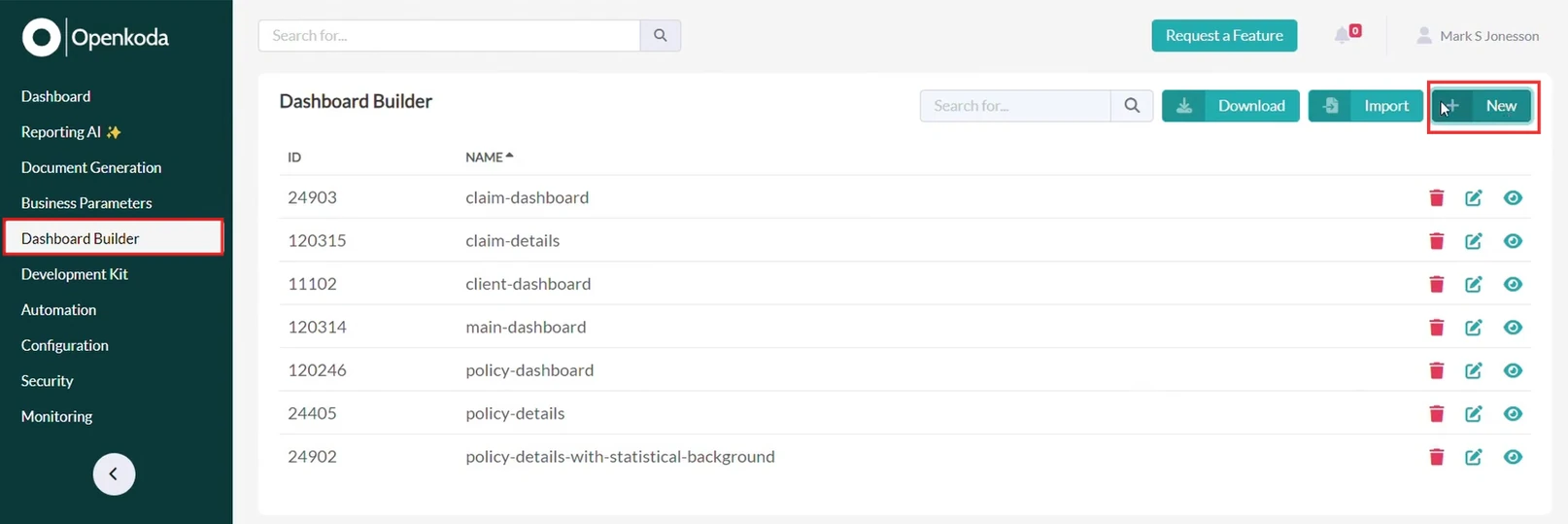
To get started, enter the Dashboard Builder in Openkoda and click on "New". This is where you can design your dashboard, structure your metrics, and add the visualizations that matter most to your business.
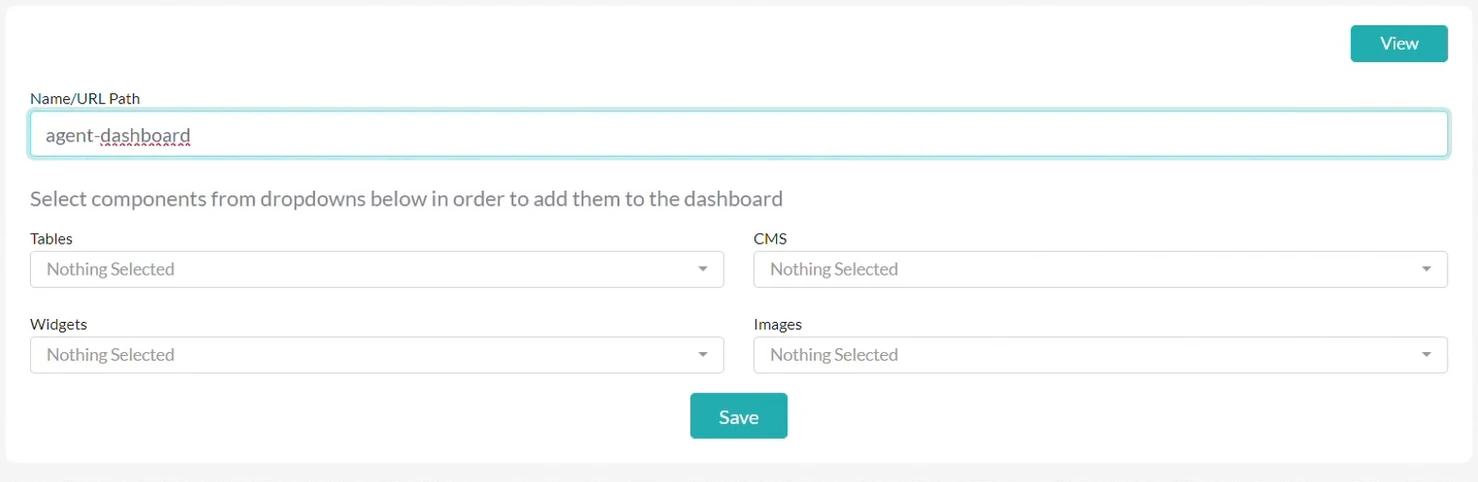
For this tutorial, we will create a dashboard for an insurance agent, helping them track sales performance, claims processing, and pending tasks.
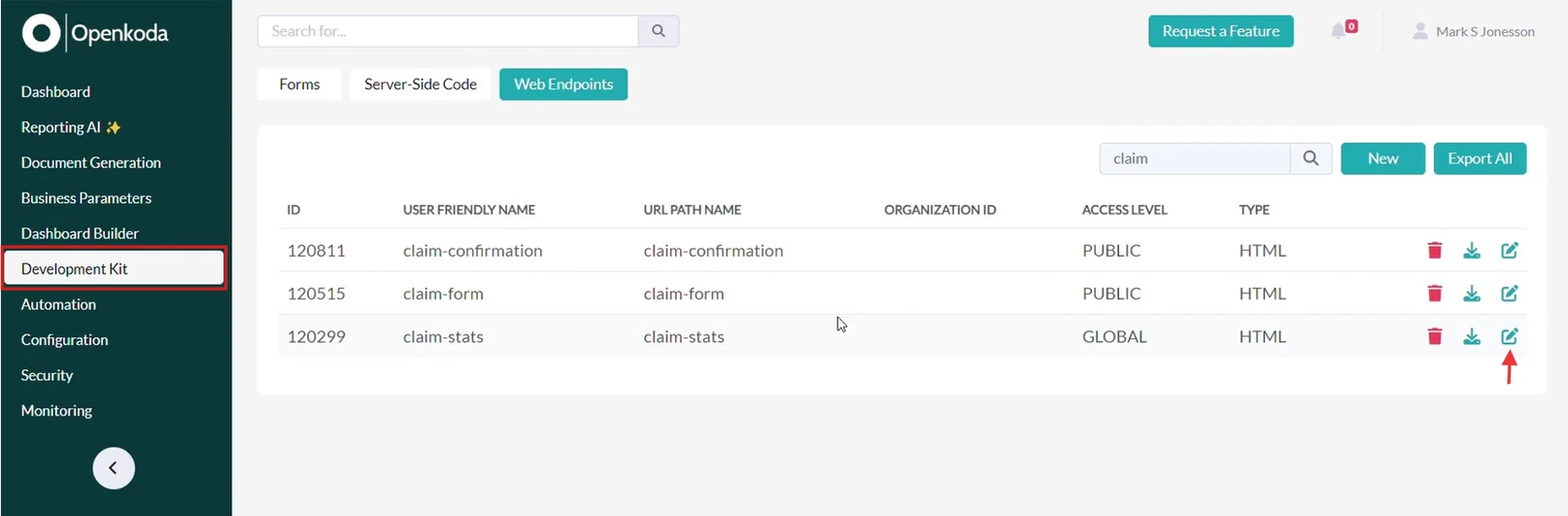
To ensure your dashboard provides relevant insights, you need to select the right widgets and data sources.
Openkoda allows you to pull in real-time data through web endpoints, which you can customize based on your business needs.
Go to Development Kit and then Web Endpoints and look for relevant data sources you want to add to your dashboard as a widget. By clicking on Edit, you can modify and customize them to your preferences with no limits.
Widgets can represent a variety of insights, such as:
By defining custom web endpoints, you can pull in the exact data you need, ensuring your dashboard is both useful and personalized.
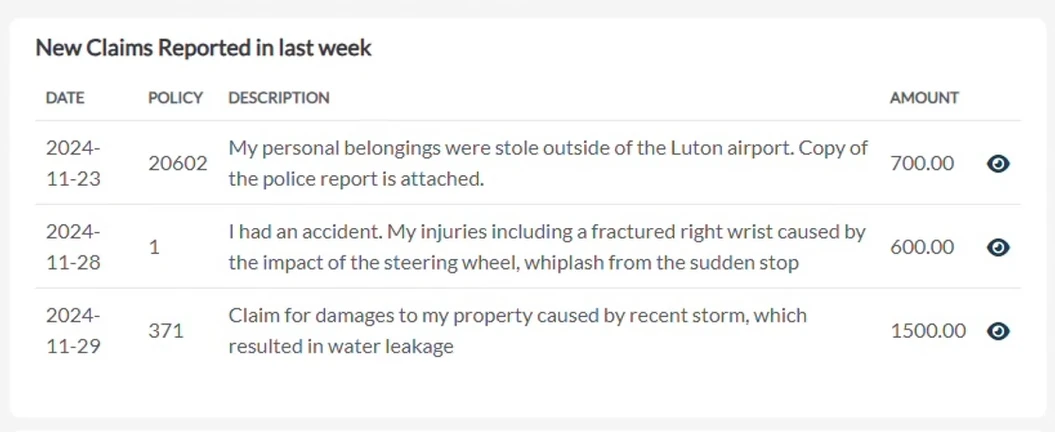
For example, a Web Endpoint with new claims will look like this on your dashboard:
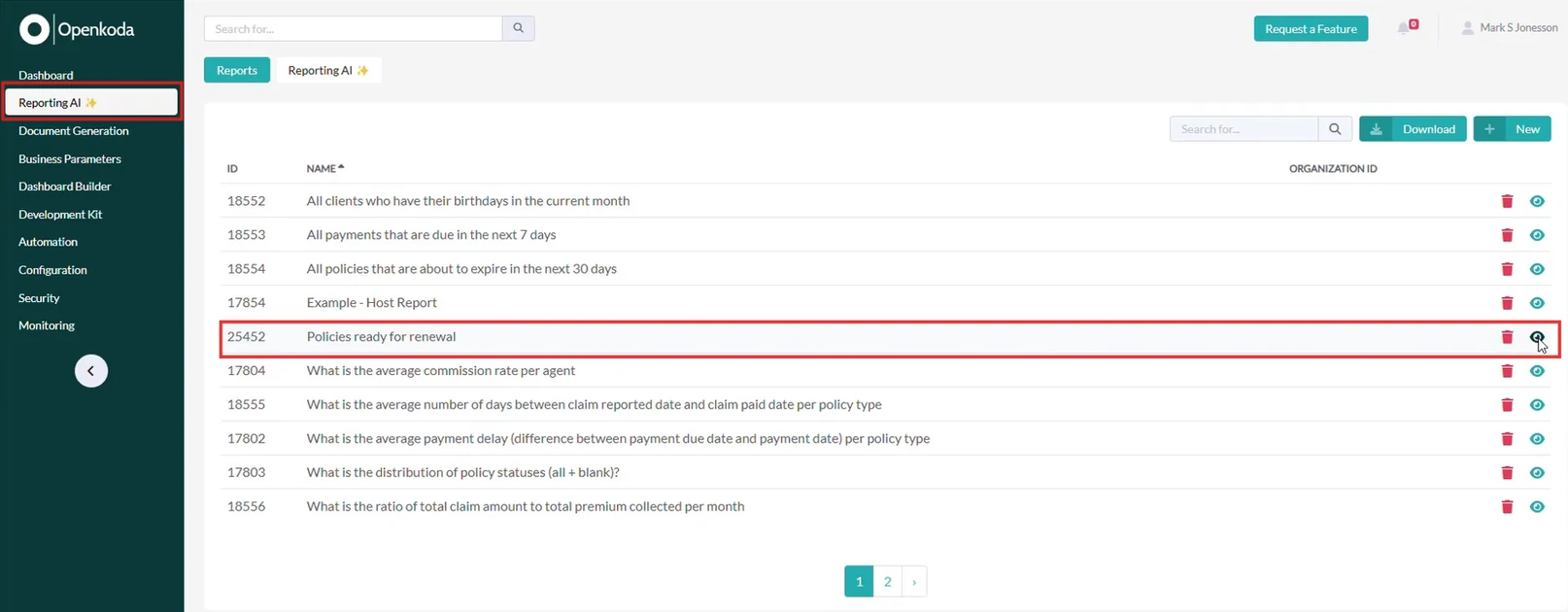
In Openkoda you can also add custom, AI-powered reports to your dashboard for deeper analysis and trends.
The Reporting AI tool lets you generate reports using natural language, so you can create ad-hoc queries without the need for complex SQL knowledge.
For example, if you want to analyze policies that are up for renewal, you can simply ask Reporting AI to generate a report. Watch this video to learn how to use Reporting AI.
Once you have created your report, you can save it and automate it to run periodically or download it to Excel for further analysis.
Now we will show you how to integrate your report into your dashboard to track policy renewals over time, helping you anticipate customer needs and improve retention strategies.
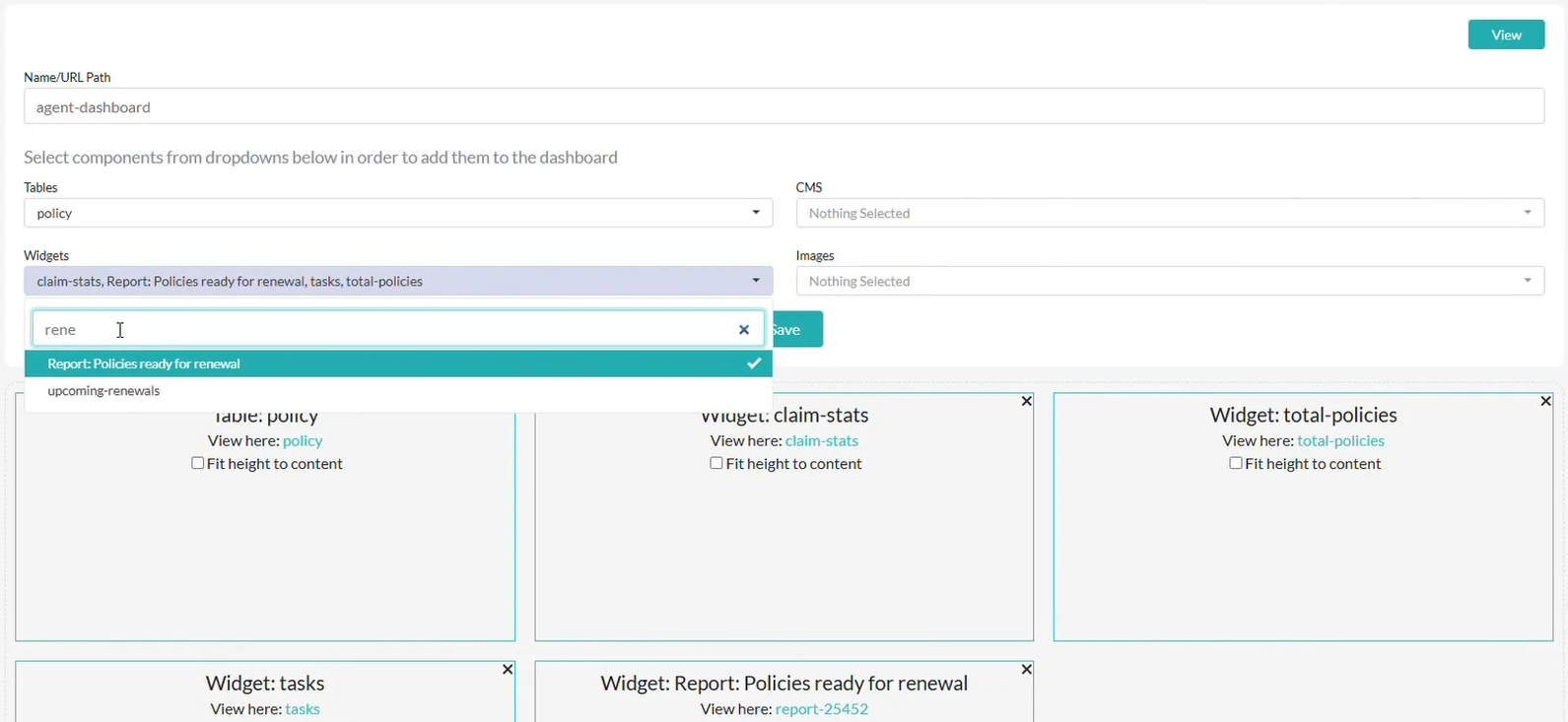
First, pick your widgets, tables with policies and the report in Dashboard Builder.
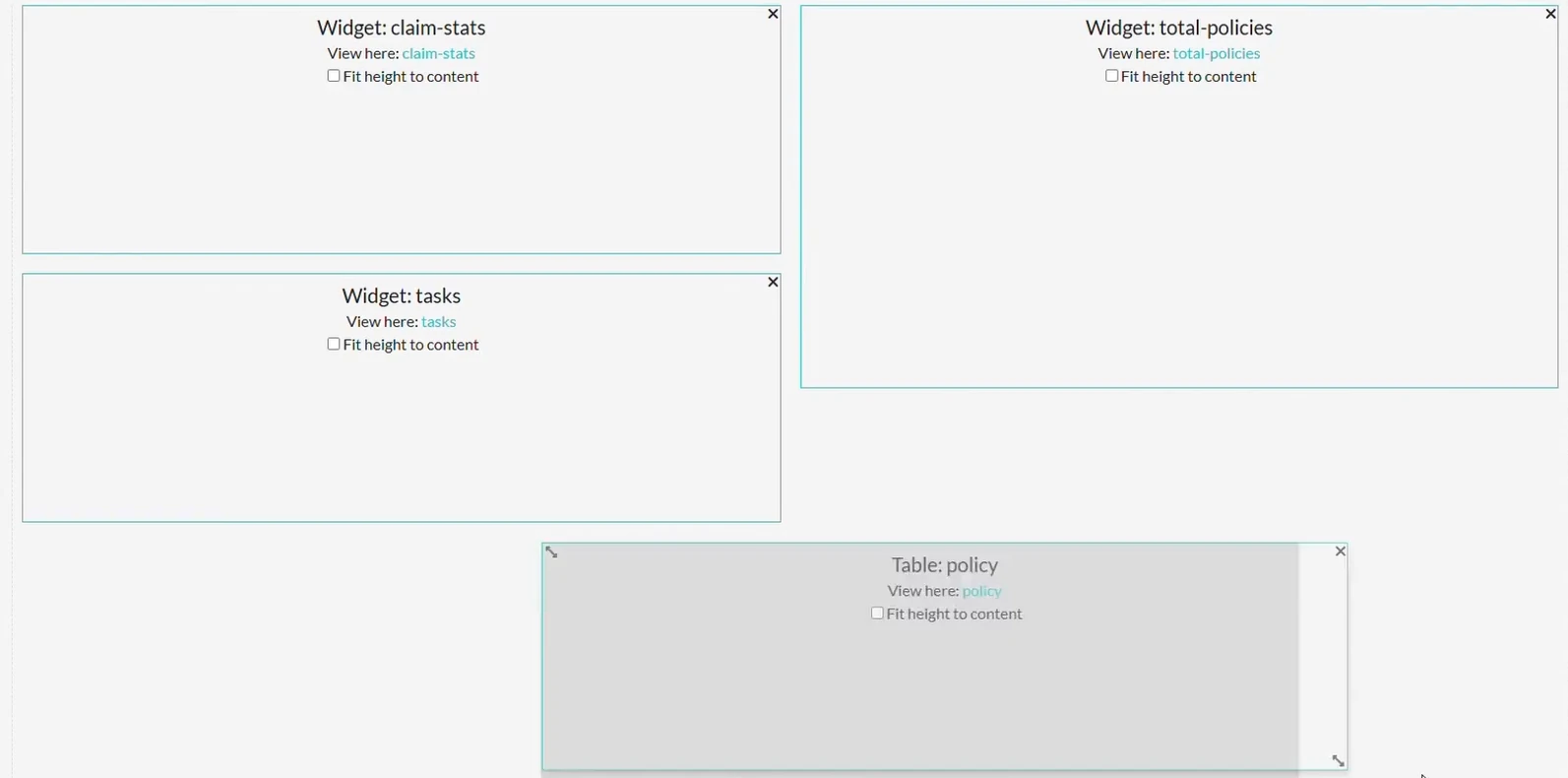
Now organize your dashboard for maximum efficiency using drag-and-drop and arrange elements based on priority and user preference.
For an insurance agent, the dashboard might include:
By customizing the layout, you ensure that agents and managers have quick access to the data they need, without distractions or unnecessary clutter.
You can also personalize the look and feel of your dashboard and the entire Openkoda interface. To learn how to do it, see this tutorial: How to Personalize Your Openkoda Interface to Match Your Brand.
By setting up a custom dashboard, you create a streamlined way to track performance, manage tasks, and optimize decision-making. Whether you're an insurance agent, manager, or business owner, having real-time data at your fingertips helps you stay ahead of challenges and identify new opportunities.
Want to try it out yourself? Get started with Openkoda today and see how easy it is to build and customize your own insurance applications. Schedule a demo with us.

Build a motor rating engine from four tables: derive the ages you do not store, combine the factors, add fees and tax, then price a real risk and reprice it.

Automate a claim acknowledgment end to end: a Word template with placeholders, the email that carries it, and a workflow that fires when the claim form arrives.
Build a billing desk board tile by tile, then a second one by describing it in a sentence, and make one the screen your team signs in to.
Book a live, personalized demo with our product team - tell us your use case and see the platform work with your data. No commitment.