Insurance Team Collaboration
Keep your whole team on the same page
Discuss cases in context, assign and track work, and get notified the moment something needs you - all inside the platform, next to the policies, claims and quotes your team already works on.
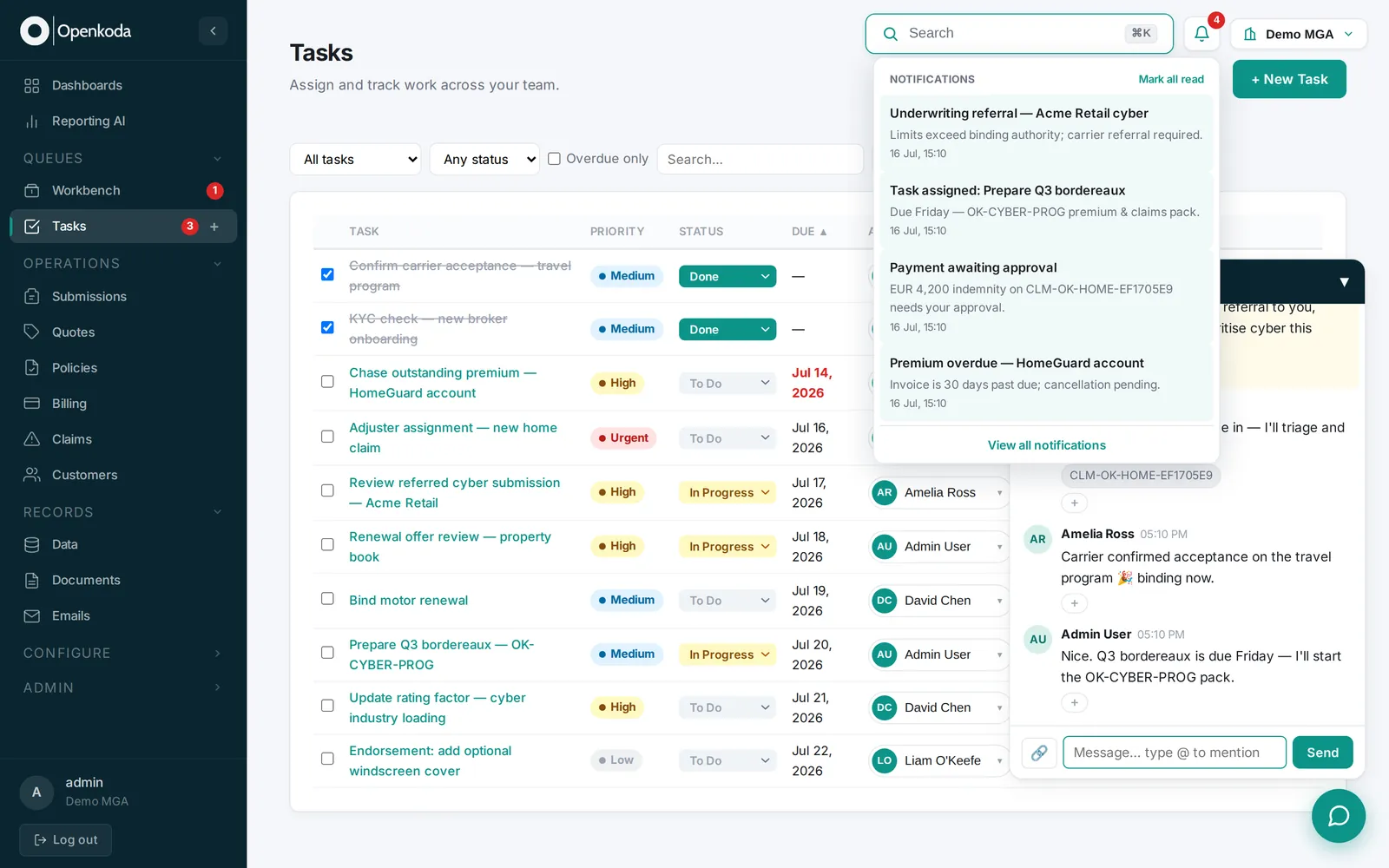
One place to work together
Chat, tasks and alerts sit next to the record - no context-switching to email.
Nothing falls through
Assignments and notifications make sure every hand-off is picked up.
Everything on the record
Conversations and tasks are attributed and audited against the account.
Collaboration where the work happens
No switching to email or a separate chat app and losing the thread - conversations, tasks and alerts live on the record itself.
What you can do
Keep the conversation on the record
Discussion happens next to the policy, claim or submission it concerns, so context never disappears into somebody's inbox. Anyone who picks the case up later can see how it got here.
Hand work over without losing the thread
Assign, mention and pass a case along with everything already attached to it. Cover an absence, escalate a referral or bring in a specialist without booking a briefing call.
Know what needs you, and when
Real-time alerts and shared queues put the next action in front of the right person. Work stops sitting untouched because nobody realised it was theirs to pick up.
Everything your insurance business needs, in one platform
In-app chat & comments
Message colleagues and comment on records without leaving the platform.
Task management
Create, assign and track tasks with due dates and status against any policy, claim or quote.
Notifications & alerts
Real-time alerts when a case is referred, assigned, updated or overdue, so the right person knows the moment there is something to do.
Shared work queues
The Workbench and Tasks queues give the team one prioritized list to work from.
@mentions & hand-offs
Pull in the right person and pass work along with the full context attached, so nothing gets lost in a hand-off.
Audit & history
Every message, task and status change is timestamped and kept on the record.
Up and running, fast
Discuss in context
Chat and comment right on the policy, claim or quote.
Assign the work
Turn a decision into a tracked task for the right person.
Stay notified
Alerts keep everyone moving - without the status meeting.
Hand off a referred case
An underwriter needs a second opinion on a referred cyber submission - without it getting lost in email.
Flag it in chat
They discuss the risk in the in-app chat, right on the submission.
Assign a task
A tracked task goes to the senior underwriter, with the case attached.
Notify & resolve
A notification lands the moment it's assigned; the decision is recorded on the record.
Illustrative example built on Openkoda's demo products.
Collaboration Software for Your Insurance Team
Built for underwriting, claims, servicing and operations teams that work cases together and hand off between roles. Discussion, tasks and alerts live on the record rather than in inboxes, so context survives a hand-over, an absence or an escalation.
Questions, answered
Is the chat inside the platform or a separate app?
Do tasks and messages attach to records?
Are conversations and tasks audited?
Is collaboration on every plan?
Does it replace email or Slack?
Can we control who sees what?
Does it work across multiple teams or organizations?
See Openkoda in your context
Book a live, personalized demo with our product team - tell us your use case and see the platform work with your data. No commitment.