UK MGA Insurance Market Report 2026
UK MGAs wrote about £7.2bn of premium in 2025, up a fifth. Lloyd's, the FCA, the PRA and the capital behind MGAs spent the same year deciding how much of it to trust.
Most of a bespoke insurance brief is standard policy administration. Scope the 80/20 split, start from a configurable PAS, and build only the rest.

An insurance application can have unusual requirements while still relying on familiar processes: capturing submissions, pricing risks, issuing policies, handling endorsements, collecting premiums, and managing claims.
The distinctive parts might be a specialist underwriting workflow, an unconventional coverage structure, or a particular distribution model. Those details matter. They do not necessarily justify developing an entire insurance system from scratch.
A highly customizable policy administration system offers another route. Start with working insurance functionality, configure it around your business, and concentrate custom development on the requirements that genuinely need it.
With Openkoda, that approach can take a focused implementation from initial scoping to a production-ready system in around three weeks.
Before commissioning a bespoke application, examine how much of the proposed system is already standard insurance functionality.
A specialist commercial product may require unusual risk questions and referral conditions. It will probably still need customer records, quotations, policy documents, endorsements, renewals, invoices, and reporting.
Building all of that independently creates work well beyond the initial screens and workflows. Each transaction has to stay consistent with the policy record, the financial position, the documents, the permissions, and the reporting.
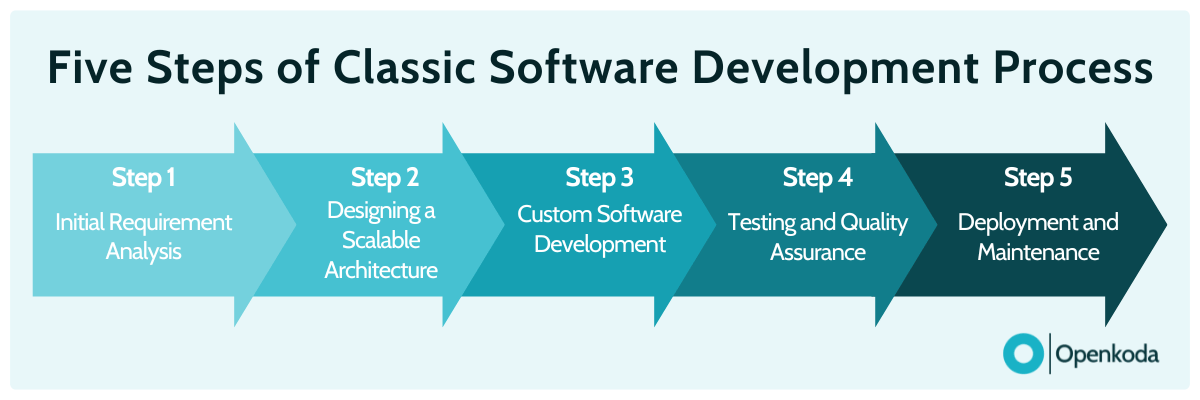
The Pareto principle gives a useful scoping heuristic: treat roughly 80% as established insurance operations and 20% as the requirements specific to your business. The actual split will vary, so validate it against your own requirements.
Start by identifying:
This exercise can change the project brief substantially. What initially looks like a custom insurance software project may turn out to be a policy administration system with a distinctive set of rules and workflows.
The strongest case for custom development then sits in those specific requirements.
Openkoda is a complete, highly customizable PAS with 12 connected modules already in place.

These cover product building, rating, workflows, forms and distribution, policy administration, underwriting, claims, billing, document generation, reporting, bordereaux, and team collaboration. See the full Openkoda feature set.
The system also provides shared capabilities such as role-based access, audit trails, data isolation, APIs, and deployment options. Those support the insurance processes your team will configure. Openkoda’s technology and security.
You work with Openkoda’s insurance specialists and development team to adapt the PAS to your products and operations. The team brings experience delivering insurance and financial systems, and offers configuration, integrations, and custom development services. About the Openkoda team.
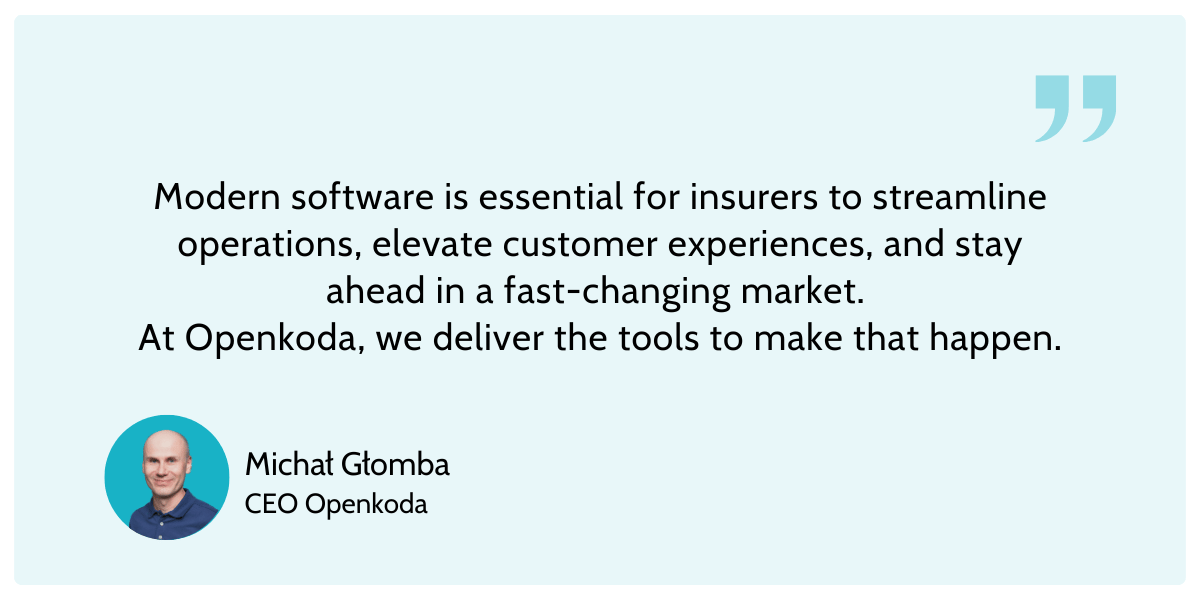
A focused implementation can reach production in around three weeks. The scope agreed at the outset determines whether that target fits, particularly where data migration or external integrations are involved.
The engagement follows five practical stages:
Openkoda’s published engagement model covers scoping, configuration analysis, implementation, deployment, and continued development. Openkoda plans and pricing.
During implementation, you can shape:
Openkoda’s Enterprise offering adds client and broker portals, single sign-on, partner submission APIs, Stripe payments, Gmail and Office 365 integrations, and the MCP server for AI assistants.
Additional connections, such as carrier feeds, rating bureaus, finance systems, or document services, can be scoped with the team. APIs and webhooks support integration with the wider technology stack. Insurance API integrations.
The result is a system configured around how the business actually operates, with the connections it needs established as part of the implementation.
Openkoda’s existing modules cover much of the functionality commonly requested in custom insurance software projects. The implementation work focuses on adapting those capabilities and connecting them into the right operating process.
The Policy Administration module connects the policy lifecycle with the information needed to service each account. Underwriting, operations, claims, and finance teams work with linked policy, customer, claim, and billing records, which removes the need to reconstruct an account’s history across separate systems.
The module accommodates product-specific fields, coverage structures, and servicing rules. A specialist scheme can therefore use established policy processes while reflecting its own requirements for insured assets, optional extensions, or mid-term changes.
Product versioning supports ongoing development. Teams introduce revised configurations while retaining the versions attached to existing policies, which keeps new business and the in-force book consistent.
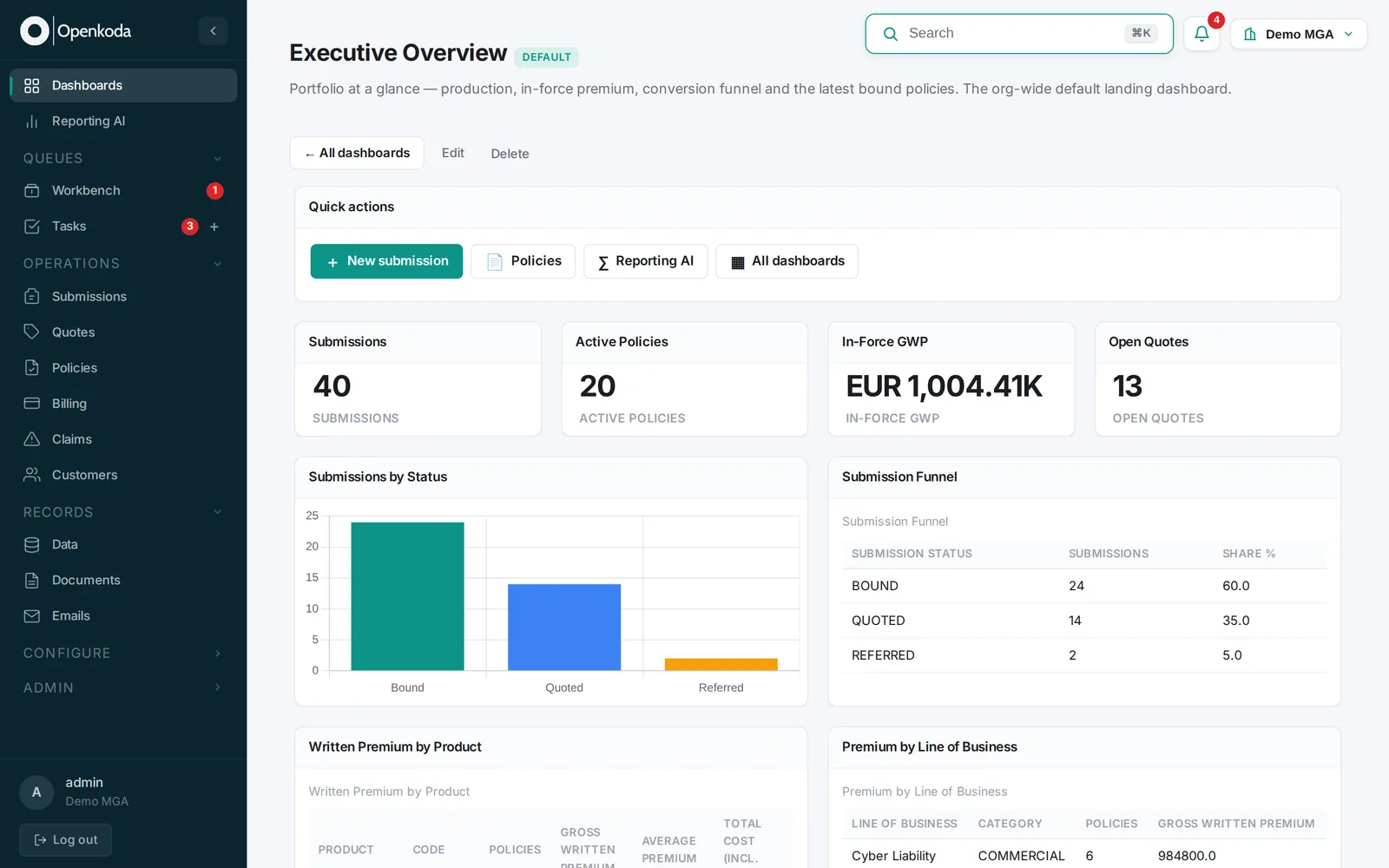
The Underwriting Workbench gives underwriters a configurable workspace for assessing submissions and recording decisions. Risk information, coverage selections, pricing, documents, and previous activity appear together, with the layout adapted to the product being reviewed.
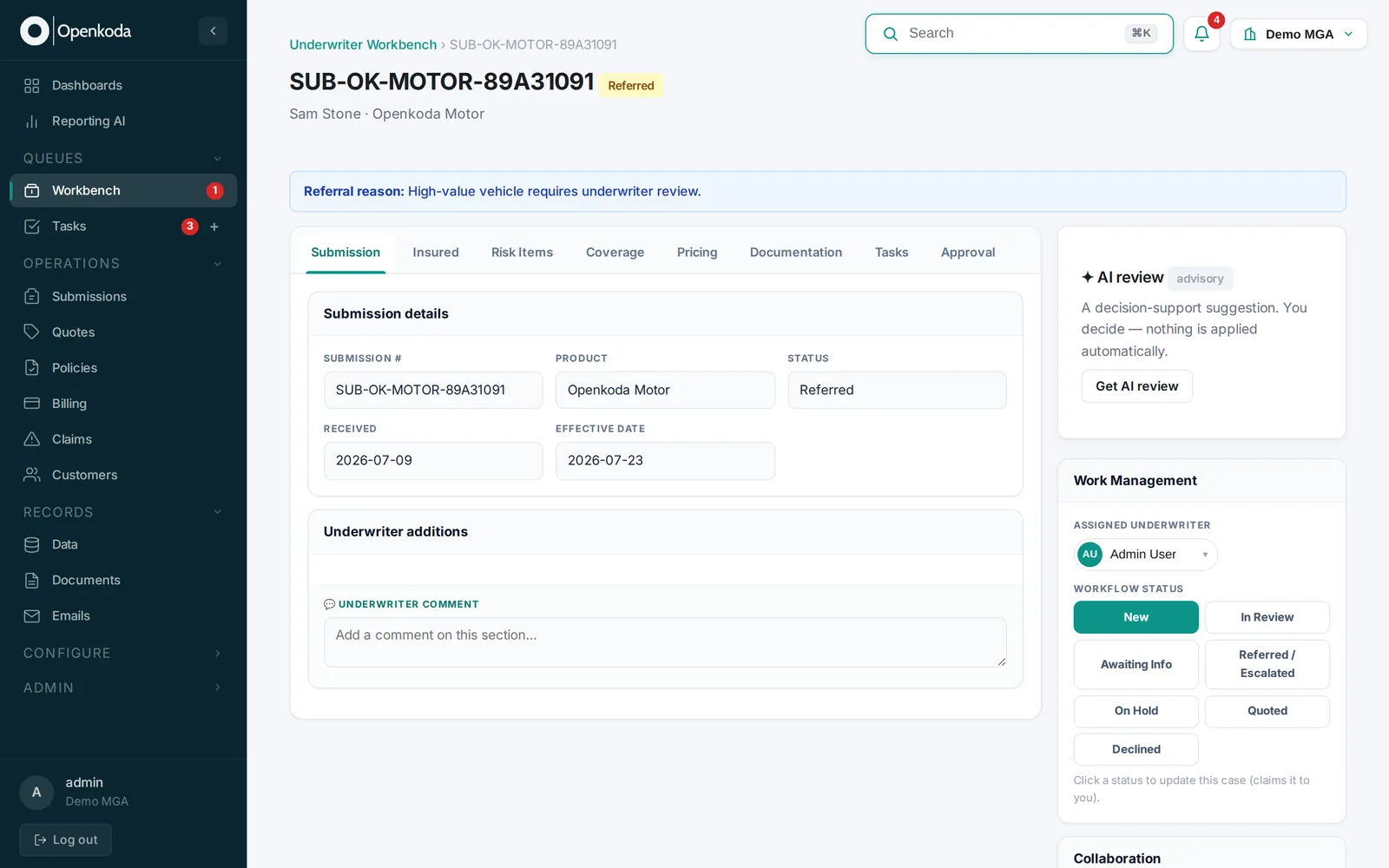
Configurable rules determine which submissions qualify for automated processing and which enter the referral queue. That lets teams apply their underwriting appetite consistently while directing attention to the cases that need judgment.
For specialist products, the workbench can foreground the information that matters to that line. The AI copilot surfaces relevant risk and pricing factors, while secure document requests help underwriters obtain missing evidence without losing the connection to the submission.
The Claims Processing module supports a claim from first notification through coverage checks, reserving, approvals, settlement, and recovery activity. Handlers work with documents, correspondence, notes, and financial movements in one connected case record.
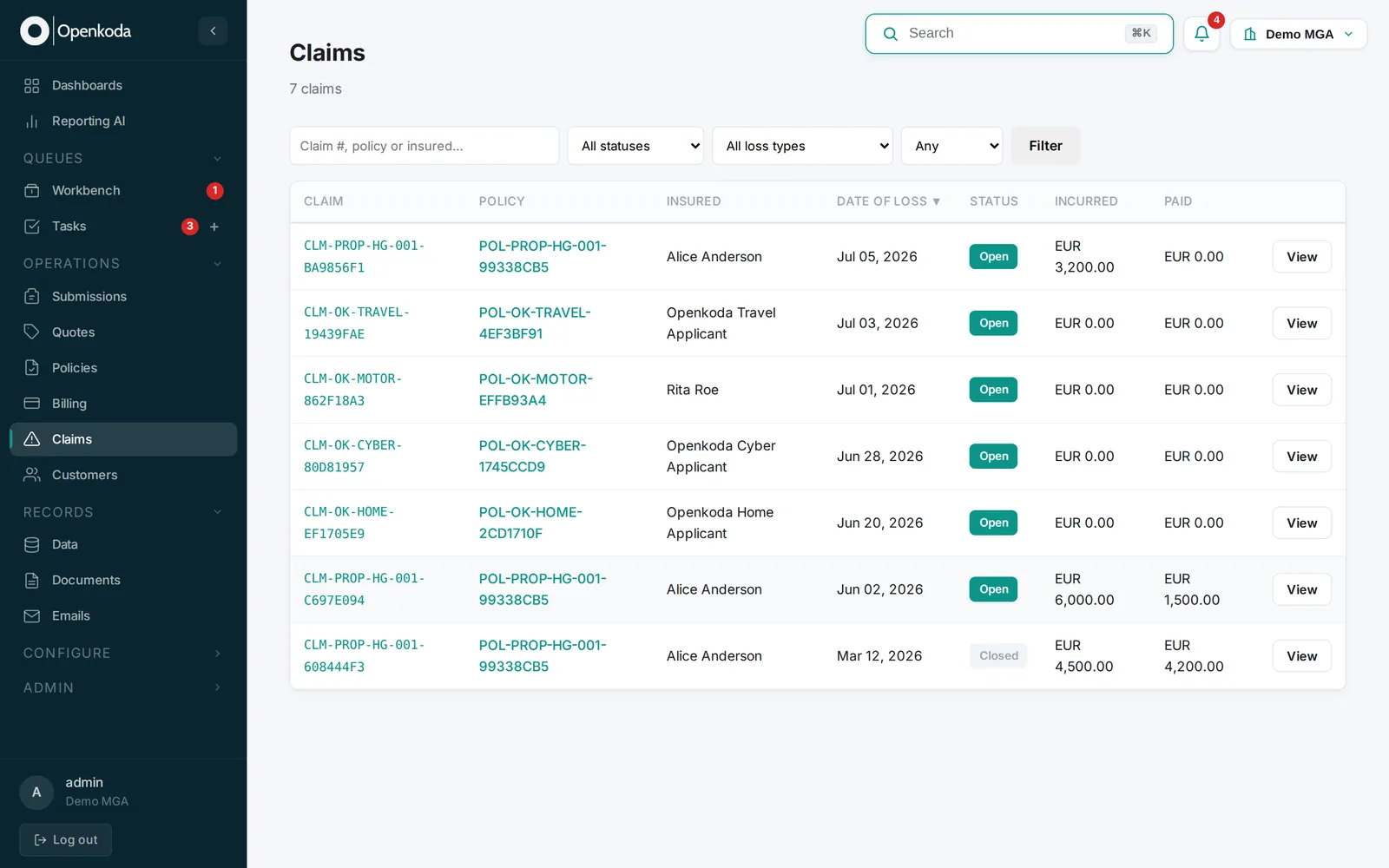
The module can be configured around different claim types, statuses, routing rules, and workbench layouts, so a team can establish separate handling paths for straightforward cases, specialist investigations, and claims requiring additional approval.
Financial controls sit inside the workflow: reserve changes stay visible, payments follow defined authority limits, and recoveries are recorded against the claim. Managers prioritize work using service deadlines, severity, and exposure.
The Document Generator connects document production directly to policy and claims data. Your team controls the templates, wording, layout, and branding, while recorded information populates the fields.
Generation and delivery run at defined points in a workflow. Issuing a policy, processing an endorsement, or completing another transaction triggers the appropriate documents, with copies stored against the account.
The module also handles inbound documents through AI extraction. Information from uploaded files can prefill a case for staff to confirm, which cuts repeated data entry during intake and servicing.
The Billing & Payments module keeps premium collection and financial records connected to the underlying policy. Invoices, payment schedules, statements, and outstanding balances stay in the billing account, giving finance and servicing teams a shared view.
Payment arrangements can vary by product, with configured reminders and follow-up actions supporting collections. The module also tracks commissions across producers and carriers, connecting distribution costs and receivables to the business that generated them.
Because billing is linked to policy administration, endorsements and cancellations flow through to the associated financial records. That connection matters most when an account changes mid-term.
The workflow automation engine connects the individual modules into an operating process, and the Forms & Distribution capabilities give customers and partners a way into that process.
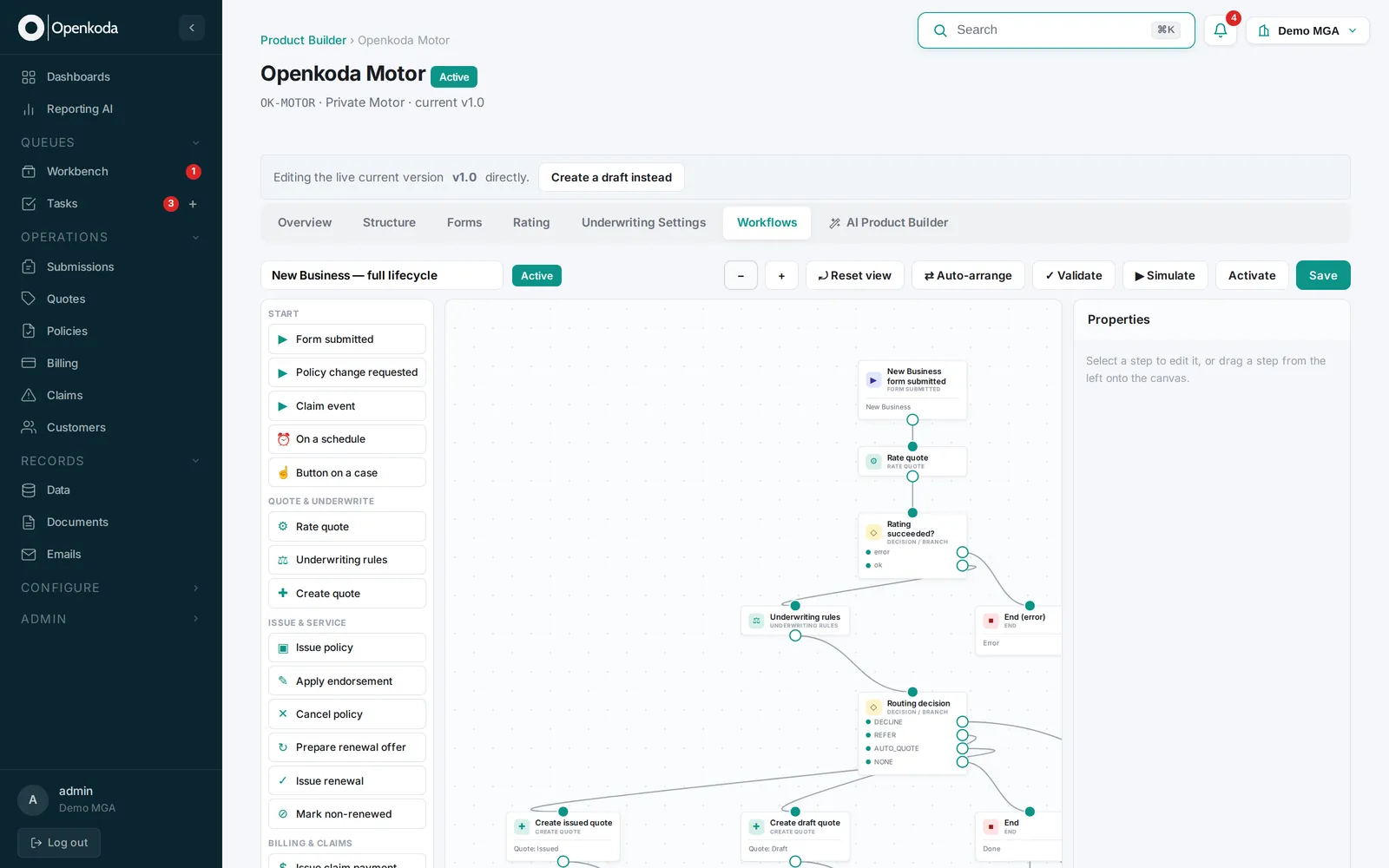
This matters most when the main difference between your business and a standard insurance operation lies in the sequence of steps, the information collected, or who makes a decision.
Openkoda’s AI capabilities support product configuration, analysis, document handling, and operational work. They run on the insurance information and workflows already inside the PAS, which is what makes them useful rather than generic.
For example, a product manager could ask Reporting AI to compare conversion by distribution partner, investigate the result, and then use AI Product Builder to draft an agreed change to the application or referral process.
Openkoda AI features are available through a separate subscription.
Imagine an MGA launching equipment insurance for a particular trade.
The requirements include several categories of equipment, optional extensions, different deductible levels, broker submissions, and an additional approval step for high-value risks.
The project still needs familiar insurance functionality: policy records, documents, billing, endorsements, claims, and reporting.
With a customizable PAS, the implementation can concentrate on:
The existing modules provide the recurring insurance processes. The customization effort goes into making the specialist proposition work.
That is the practical value of the 80/20 approach: identify the common requirements early, and direct implementation effort at the differences.
Custom insurance application development deserves a clear business case. When the requirement is predominantly policy administration with distinctive products, integrations, or workflows, a highly customizable PAS is usually the more efficient route.
Openkoda combines ready insurance modules with a team that configures and extends them around your operation. For a focused scope, that can mean a production-ready system in around three weeks, followed by continued refinement as the business develops.
Start by mapping your requirements against what already exists. The amount of software you need to build may be considerably smaller than the original brief suggests.
UK MGAs wrote about £7.2bn of premium in 2025, up a fifth. Lloyd's, the FCA, the PRA and the capital behind MGAs spent the same year deciding how much of it to trust.
Surplus lines grew 10.4% in 2025 while filings outran premium in 2026. What specialty products ask of a PAS, and five tests to run before you buy one.
Six of the best policy management software systems for 2026, split by what they actually do: insurance policy administration, or internal policy governance.
Book a live, personalized demo with our product team - tell us your use case and see the platform work with your data. No commitment.