UK MGA Insurance Market Report 2026
UK MGAs wrote about £7.2bn of premium in 2025, up a fifth. Lloyd's, the FCA, the PRA and the capital behind MGAs spent the same year deciding how much of it to trust.
How claims routing actually works, the capabilities worth testing, and eight systems that handle assignment and escalation differently.

A claim can lose valuable time before an adjuster starts reviewing it. Missing information, unclear ownership, and repeated transfers between teams all create delays. A claims routing tool helps establish who should handle the case, what needs to happen next, and when additional review is required.
The right solution connects routing with the rest of the claims process. Intake, policy information, documents, financial controls, and customer updates should support the same operational flow.
Claims routing software assigns claims and related tasks to the appropriate person, team, or work queue. It uses information about the case and the insurer's handling rules to determine the next step.
Routing usually operates within a broader claims management system, which also supports reporting a loss, reviewing coverage, recording reserves, approving payments, and closing the claim. Assignment can happen at intake and again as the case develops. Guidewire's claims assignment documentation, for example, describes automated assignment after FNOL and subsequent reassignment.
Consider an illustrative motor claim. The initial information may send it to a general handling team. A later repair estimate could trigger an additional approval, while evidence of a more complex loss could require a specialist. Each transfer should preserve the claim history and make the next person's responsibility clear.
When evaluating routing software, examine the decisions it can support: which criteria determine ownership, how workload affects assignment, what triggers escalation, and how staff can intervene when a case needs different handling.
Routing works best when it draws on reliable information and connects to the actions that follow. Use the following capabilities as a checklist when evaluating a claims processing solution.
Look for intake through web forms, portals, email, and APIs, with questions adapted to the type of loss. Validation should identify missing details before the case moves forward. Access to the relevant policy, coverage dates, limits, and deductibles helps teams establish the appropriate handling path.
Teams should be able to define routing criteria around claim type, severity, exposure, expertise, and workload. Ask how the system handles unavailable adjusters, changing capacity, and reassignment. There should also be a clear route for cases that do not match an existing rule.
Different products and losses need different processes. Look for configurable stages, decision branches, approval thresholds, reminders, and service deadlines. Workflow testing and versioning help teams check a change before applying it and understand which process governed an existing case.
Adjusters need policy information, documents, notes, correspondence, tasks, and financial activity in one accessible workspace. Configurable layouts and queues help each team focus on relevant information. A handover should give the next handler enough context to continue without repeating earlier work.
Routing should connect with financial authority. Reserve changes and payments may require different approval levels depending on the amount or role involved. Recovery work also needs ownership, follow-up tasks, and a record of money received, so teams can track the net cost of the claim.
Claimants should be able to provide supporting information and understand the status of their case. Automated updates, document requests, and a portal can reduce routine enquiries. Keep correspondence attached to the claim so any authorized handler can see what the customer has been told.
Managers need visibility into unassigned claims, overdue tasks, workloads, reserve movements, and time spent at each stage. Look for dashboards that can be adapted to different roles and reports that reveal the records behind a metric. This helps teams find where claims are waiting and why.
Useful AI capabilities include extracting information from documents, summarizing a claim, classifying incoming correspondence, and drafting an update. Evaluate how staff check and correct those outputs. Routing recommendations should remain connected to the insurer's rules, approval requirements, and available evidence.
Check how the solution exchanges information with policy administration, finance, payment providers, fraud services, and external assessors. Integrations should support actual workflow steps, such as requesting an assessment or returning a payment status, with a clear way to identify and resolve failed transfers.
Adjusters, supervisors, external partners, and investigators need different permissions. The system should record assignments, status changes, decisions, and financial approvals, including who made each change. This history supports internal review and helps explain how a claim reached its current position.
Claims Processing Software: 10 Capabilities to Check
What to put in front of a vendor, in the order a claim moves.
The following shortlist includes dedicated claims applications, broader insurance systems, and configurable workflow software. Each approaches routing differently, so ask vendors to demonstrate a routine claim, an exception, and a reassignment under a heavy workload. For a wider view of the category, see our roundup of claims management software.
Guidewire ClaimCenter supports P&C claims from intake through closure. Its assignment capabilities cover claims, activities, and individual exposures, allowing different parts of a case to reach the people responsible for handling them.
This is relevant when a claim involves several workstreams. A specialist can take responsibility for a particular exposure while other work continues elsewhere. ClaimCenter also supports activity queues and assignment rules for organizing follow-up work.
Key features:
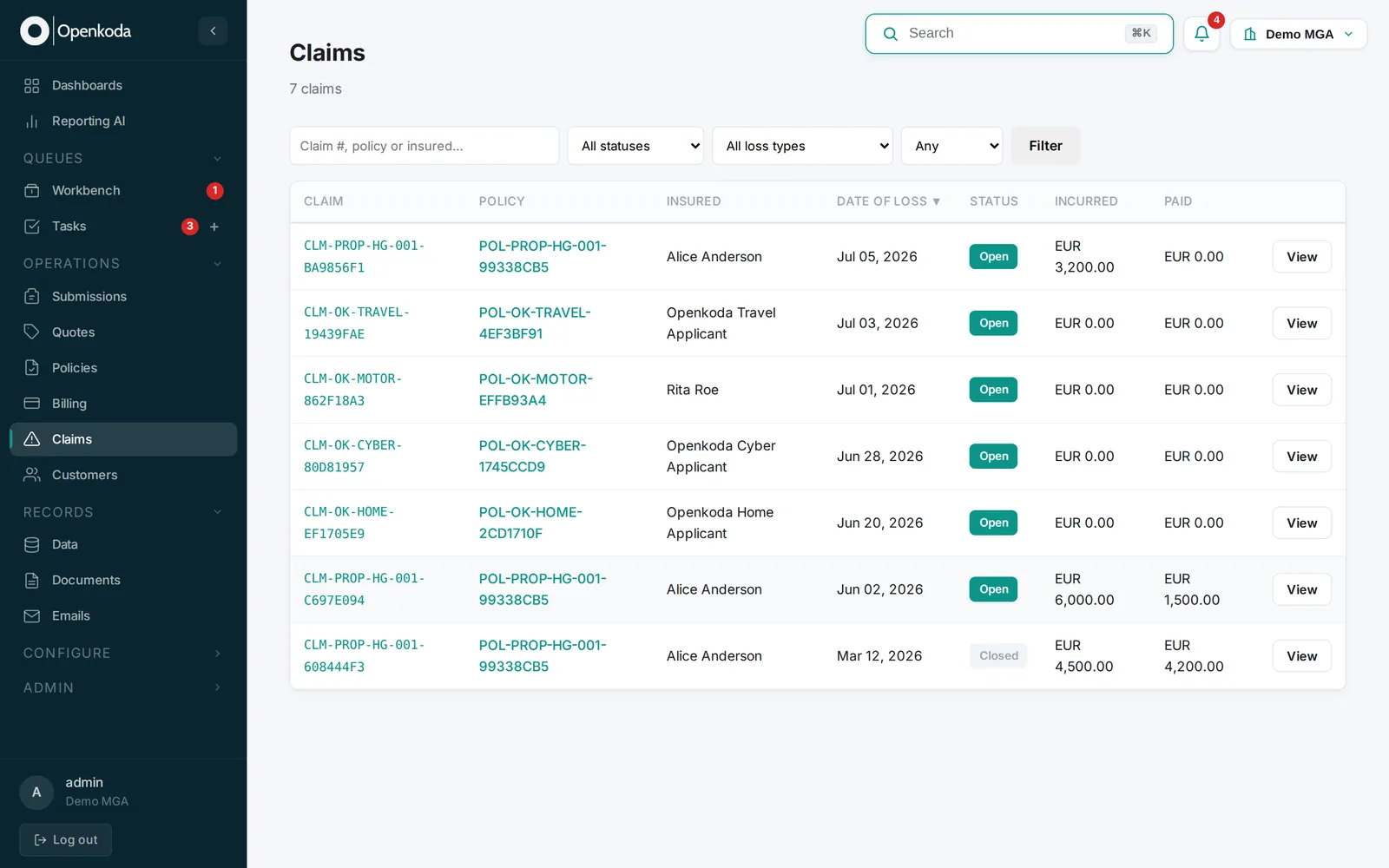
Openkoda is a highly customizable policy administration system with a deeply configurable claims module, so claims routing sits inside a wider operational process. Policies, underwriting, claims, billing, documents, and reporting are managed through connected modules, giving teams access to information from across the insurance lifecycle.
Within the claims module, insurers can configure claim types, statuses, routing rules, and workbench layouts. A straightforward loss can follow a short handling path, while a complex claim moves through specialist review, additional document requests, and approval stages. Assignment, reminders, and escalations can be automated around those processes.
The system can evolve with the insurer's requirements. Teams can adjust business rules and workflows, connect external services, and use custom development support when they need functionality beyond standard configuration.
Key features:
See how your claims process could work in Openkoda. Explore routing rules, approval paths, and the claims workspace in a live demo tailored to your requirements.
Duck Creek Claims combines claims lifecycle management with configurable assignment and routing. Its rules can use coverage type, handler expertise, and workload information to direct cases, while escalation and load balancing support teams during busy periods.
The system also connects routing with investigation, reserves, payments, and recovery work. It is worth considering for P&C insurers seeking detailed control over several stages of claims handling.
Key features:
Sapiens ClaimsPro supports personal and commercial insurance claims through configurable workflows, automated assignment, and case management. Its routing capabilities include workload balancing, while predictive models can support initial severity assessment.
ClaimsPro also brings documents, activities, and communications into a central case record. Its catastrophe management capabilities make it relevant to insurers that need to organize claims activity during events affecting many policyholders.
Key features:
Majesco Claims for P&C manages claims from FNOL through closure, with analytics and AI assistance available within adjuster workflows. Its Copilot and task-specific agents can help teams summarize information, triage and assign work, and prepare correspondence.
The system also provides task management and connections to external services. It is a candidate for P&C insurers evaluating claims automation alongside AI assistance with approvals and audit controls.
Key features:
Pega provides case management and workflow tools that insurers can configure around claims processes. Its routing capabilities can assign work to an individual or a queue using information such as claim amount or location.
Pega also supports predictive approaches to prioritization and escalation. This makes it worth considering when the main requirement is coordinating work, exceptions, and decisions across an insurer's existing applications.
Key features:
Insurity Sure Claims supports claims processing with configurable workflows and automated adjuster assignment. Assignment can take account of skills, geography, and availability, helping teams direct work according to their operating model.
The product also includes alerts, diaries, digital communication, and integrations for claims payments and analytics. It is relevant to P&C carriers and MGAs seeking a claims application with configurable handling rules.
Key features:
BriteCore Claims connects claims administration with business process management inside the wider BriteCore offering. Policyholders, agents, and adjusters can submit a loss through their portals, with relevant policy and contact information carried into the claim.
The system supports collaboration, financial tracking, and assignment of multiple adjusters to one claim. It is worth considering for P&C insurers seeking claims handling connected to their policy records and digital service channels.
Key features:
Routing depends on information that often arrives in emails, attachments, photographs, and free-text loss descriptions. Generative AI can help prepare that information for review by extracting details, summarizing a case, and identifying what needs attention next.
These capabilities are already appearing in claims products. Majesco's claims offering, for example, describes AI assistance for summarization, triage, assignment, and correspondence within adjuster workflows.
It helps to separate three functions when evaluating a solution:
Ask a vendor to demonstrate how these functions work together when information is incomplete or changes midway through a claim. Handlers should be able to inspect the source material, correct the record, and understand why work was assigned or escalated.
The practical goal is to reduce time spent preparing and transferring cases while giving the next handler useful context. A strong claims routing solution makes ownership clearer, keeps tasks moving, and preserves the evidence behind each decision.
UK MGAs wrote about £7.2bn of premium in 2025, up a fifth. Lloyd's, the FCA, the PRA and the capital behind MGAs spent the same year deciding how much of it to trust.
Surplus lines grew 10.4% in 2025 while filings outran premium in 2026. What specialty products ask of a PAS, and five tests to run before you buy one.
Six of the best policy management software systems for 2026, split by what they actually do: insurance policy administration, or internal policy governance.
Book a live, personalized demo with our product team - tell us your use case and see the platform work with your data. No commitment.