
Insurance Form Builder
In insurance, every interaction starts with information.
Whether someone is requesting an insurance quote form, reporting a loss, or updating policy details, the quality of that first step affects speed, accuracy, and customer experience. That is why an insurance form builder has become such an important tool for the modern insurance industry, helping teams replace physical paperwork with flexible digital online forms and smarter data collection workflows.
What Is an Insurance Form Builder?
An insurance form builder is a tool that allows insurers and other insurance businesses to create, manage, and deploy digital insurance forms without building every form from scratch. In practice, it is used to design everything from a simple insurance quote form to claims intake forms, policy application forms, renewal requests, and even consent forms.
Instead of relying on static PDFs, spreadsheets, or manual email exchanges, insurance teams can use a form builder to create structured, interactive custom forms that guide users through the right questions. This improves data collection, makes answers more consistent, and reduces friction for both internal teams and customers.
A good insurance form builder is not just about layout. It also supports business logic, validation, branding, workflow triggers, and connections with the wider platform or core system. In other words, it turns ordinary online forms into operational tools that support underwriting, service, and claims processes.
How Does an Insurance Form Builder Work?
At a basic level, an insurance form builder lets users define fields, labels, logic, and actions through a visual interface.
A business user or product team can set up the fields needed for an insurance quote form, such as personal details, coverage preferences, insured item data, or risk-specific questions. They can then decide which fields are required, which answers trigger follow-up questions, and where the data should go after submission.
This is where the real value appears. The form does not simply collect data and sit in an inbox. It can support form creation with validation rules, automate routing, and connect form submissions to downstream workflows. For example, one insurance quote form may send data directly to underwriting, while another may trigger a claims review or create a new customer record.
Modern tools also make it possible to publish forms across different digital channels. An insurer may place an insurance quote form on a website, embed it in a partner journey, or make it available inside a customer portal. Strong solutions are also optimized for mobile devices, which matters because many users now start or complete insurance interactions on their phones.
In platforms built for insurance, form builders often go a step further.
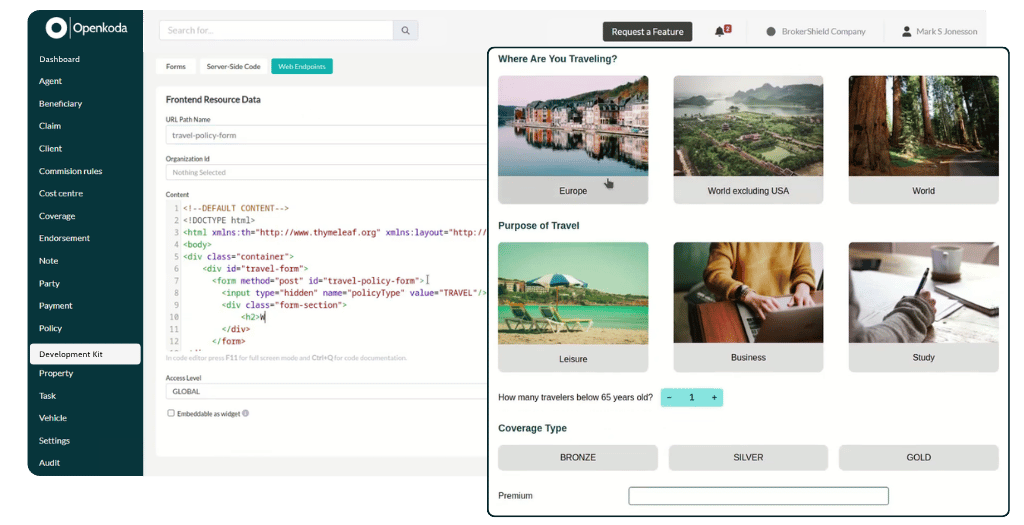
Openkoda, for example, highlights the ability to create fully customizable insurance forms for quote requests, policy sign-ups, and claims, and embed them directly into a website or app.
Its broader platform also emphasizes modular features, embeddable quote forms, workflows, and seamless integrations, which is important when form submissions need to move quickly into real business processes.
Key Benefits of an Insurance Form Templates
The biggest advantage of digital insurance forms is not just convenience.
It is the ability to streamline data collection, improve accuracy, and make the customer journey feel more natural. A well-designed insurance quote form can shorten turnaround times and help insurance teams generate better-quality insurance quotes with less manual work.
- Faster form creation for quote, application, service, and claims processes
- More consistent data collection across products and teams
- Less dependence on physical paperwork and manual re-entry
- Better user experience for customers completing online forms
- Easier handling of form submissions through automated workflows
- Improved support for compliance through required fields, validations, and auditability
- Stronger presentation with custom branding across forms and customer touchpoints
- Better accessibility on desktops and mobile devices
- More flexibility to adapt insurance forms to changing products or regulations
- More efficient generation of insurance quotes by collecting the right data upfront
Common Features of an Insurance Form Builder
Not all tools are equal, but strong solutions tend to include a similar core set of capabilities. These features help insurers move beyond simple form capture and build more useful digital experiences.
- Drag-and-drop or visual form creation
- Support for custom forms tailored to specific insurance products
- Templates for common insurance forms, including insurance quote form journeys
- Conditional logic and dynamic fields
- Field validation and required data rules
- Digital handling of consent forms
- Easy publishing to a website, portal, or partner interface
- Responsive design for mobile devices
- Workflow triggers tied to form submissions
- Dashboards or tracking for monitoring form submissions
- Custom branding options for logos, colors, and interface consistency
- Export tools and reporting support
- Seamless integrations with CRM, policy, claims routing tools, or document systems
- Options that resemble a no code form builder experience for business users, while still allowing deeper customization when needed
Who Needs an Insurance Form Builder?
The short answer is: almost any organization that collects insurance-related information digitally.
Traditional insurers use these tools to support quote generation, onboarding, renewals, service requests, and claims reporting. For them, a strong insurance form builder reduces manual work and helps standardize how information enters the business. This matters especially for insurance providers operating across multiple lines of business, where forms often need to be updated quickly.
MGAs, brokers, and insurtechs also benefit. They often need flexible insurance quote form journeys that can be adjusted for niche products, distribution partners, or changing underwriting requirements. In these environments, speed matters. Teams want to launch new insurance forms without waiting through a long development cycle.
Embedded insurance players need it as well. If insurance is offered inside another digital journey, the form experience has to feel natural, branded, and easy to complete. That is why embeddable and customizable online forms are becoming more important across the wider insurance industry.
How to Choose the Right Insurance Form Builder
Choosing the right solution starts with one practical question: do you just need a basic no code form builder, or do you need a form tool that fits into a broader insurance platform and can evolve with your products, workflows, and compliance requirements?
Here are the main things to look for:
- Choose a solution built with the insurance industry in mind, not just generic online forms
- Make sure it supports different use cases, including every major insurance quote form, service form, policy update flow, and claims intake
- Look for strong customization options so you can create custom forms instead of forcing your processes into rigid templates
- Check whether business users can handle everyday form creation without heavy developer involvement
- Confirm the tool supports custom branding so forms feel consistent with your website and customer experience
- Prioritize responsive design for mobile devices
- Review how it handles compliance, required fields, validation, and secure data collection
- Make sure it supports API-first integrations with policy administration system, CRM, document management, or claims management systems
- Evaluate what happens after form submissions: can the platform trigger workflows, approvals, notifications, or record creation automatically?
- Look for room to scale, especially if your products or partner distribution models change often
This is also where Openkoda is worth considering.
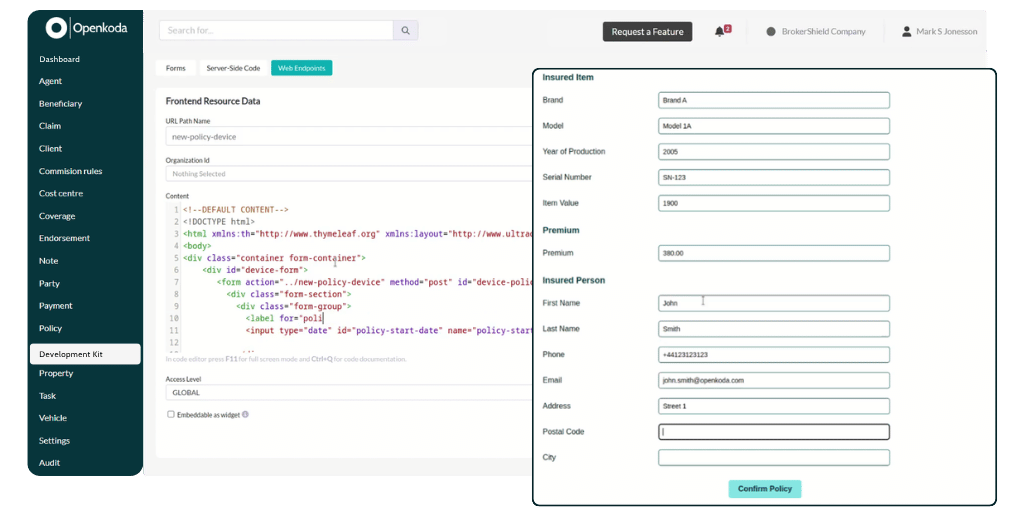
On its official site, Openkoda describes a way to design fully customizable insurance forms for quote requests, policy sign-ups, and claims, then embed them into a website or app.
It also positions its platform around modular architecture, pre-built templates, workflows, embeddable quote forms, and open customization, which is valuable for insurers that want more than a basic standalone no code form builder. In other words, it can support easy day-to-day form creation, while still giving teams the flexibility to build more advanced, insurance-specific processes over time.

